- 2026-08-26
- by LethaldiranMX
- Trends
- 0 Comments

LethaldiranMX Insight
Easy Bootstrap Shortcode serves as a visual layout utility for integrating Bootstrap 3.2.0 components directly into the classic WordPress editor via TinyMCE buttons. It streamlines the process of adding responsive grids, accordions, tabs, and over 500 icon fonts without requiring content creators to write raw HTML. By allowing developers to disable the default plugin CSS and JS in favor of custom files or CDNs, it offers a practical way to maintain styling consistency across non-Bootstrap themes.
Best Fit & Operational Role: This plugin is best suited for site administrators and content editors managing legacy WordPress installations that rely on the classic editor and Bootstrap 3 styling. It fits into the WordPress stack as a content-authoring aid, solving the operational challenge of building complex, multi-column layouts and interactive UI elements directly within the post editor.
Potential Limitations & Pitfalls: A primary operational risk is that changing the custom shortcode prefix post-installation will break all existing shortcodes generated by the plugin, requiring this setting to be finalized immediately upon deployment. Furthermore, the plugin’s functionality is strictly tied to the TinyMCE editor interface and older Bootstrap 3.0.3/3.2.0 specifications, which limits its adaptability in modern block-based editing environments or projects utilizing newer frontend frameworks.

Easy Bootstrap Shortcode enable you to add bootstrap 3.0.3 styles in your pages, post and custom post in simplest manner.
For plugin support go to https://support.oscitasthemes.in
Ready for WordPress 4.3 and support Twitter 3.2.0
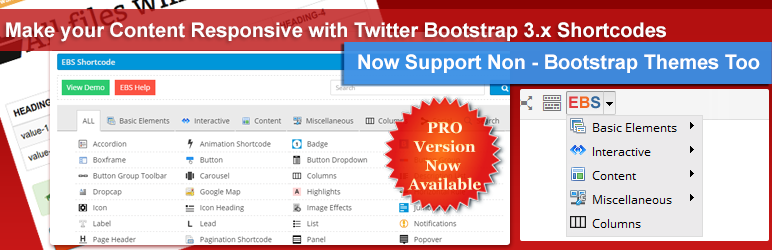
Easy Bootstrap Shortcode is bootstrap 3.2.0 compatible plugin which add icons to wordpress editor (tinyMCE Shortcode Buttons) and one can add bootstrap style to their website just by clicking on tinyMCE editor icon.
New improved EBS-Pro Version
Just by one setting, you can use bootstrap styles in your themes, which are not bootstrap based themes using Bootstrap Shortcodes
Features:
- simplest bootstrap style plugin ever.
- IE 6+ compatible
- Bootstrap 3.0.3 compatible.
- 500+ Font-Awesome & Glyphicons Icon Fonts
- No need to paste shortcode in editor.
- Add icons to editor.
- Shortcode added to editor by clicking on icon.
- Customize grid size on small, extra-small and medium sized screens.
- More control over the css, you can add your own custom class to shortcodes.
- Now you can use js file from CDN or disable the plugin js.
- You can use your own css file by disabling the plugin css, which gives you more flexibility over styling.
- New sidebar widget to show shortcodes in sidebars and footer
- New option to give custom shortcode prefix.
Note : This settings is provided to remove the shortcode confliction with any other existing shortcode, but be careful while changing the Shortcode Prefix, as existing shortcodes (created with EBS Plugin) will not work if changed the existing prefix. So we advice to change it when you install the plugin.
Easy Bootstrap Shortcode provides following styles
Grid Columns
- Add multiple columns in a row
- Choose desired column width
- Add offset to columns
- Provide facility to customize a column according to medium, small and extra-small sized screens.
- Responsive columns
Shortcodes for
- Accordion (Collapsible Menus)
- Tabs
- List
- Notification
- Popover
- Tooltip
- Panel
- Progress Bars with labels
- Icons (250 Glyphicons & also support Fontawesome Icons)
- Labels
- Buttons
- Icon Heading
- Tables
- Responsive Image
- Image Effects (Round, Thumbnail, Square)
- Well
- Button Dropdown
- Button Group
- Button Group Toolbar
- Description List
- Service Box
- Responsive slider
- Badges
- Jumbotron
Many more shortcodes coming soon…..
Note : we have removed the Line Separator, Dropcaps, Youtube & Vimeo video, Boxesframes, Horizontal Rule, Testimonial, Section Heading, Social, Lead,Page Header, Highlights shortcodes as these are PRO version features, which were committed to free version by mistake.
How to embed this plugin to your theme
We have provided few new settings so that anybody can give inbuilt compatibility with our plugin. Such as if you are creating theme/plugin and want to use our plugin, to give your users more flexibility to add responsive content, however you like to use your own custom css/js files. So now you can do this.
People’s view
- 10+ Amazing WordPress Bootstrap Plugins
- 10+ Best WordPress Bootstrap Plugins | WP Template
- 18 New Free Bootstrap WordPress Widgets
- Top 30 Free WordPress Shortcode Plugins
- 45+ Free WordPress Shortcode plugins/widgets
- 75+ Best WordPress Shortcodes Plugins
- Easy Bootstrap Shortcode Recommended Plugins
- Easy Bootstrap Shortcode Recommended Plugins
- Paid themes using EBS
If you’d like to contribute to this plugin, you can find it hosted on GitHub.
Follow us @Twitter, @facebook, @google+
Editorial note: This overview combines WordPress.org official plugin metadata with an AI-assisted LethaldiranMX editorial review. Plugin data should be verified on the official WordPress.org listing before installation.