• Home
  • Services
    • Col 1
      • Tech & Analytics
      • Web Development
      • Technical Audit
      • Analytics & Tracking
    • Col 2
      • Growth Marketing
      • SEO Strategy
      • SEM & PPC
      • Social Growth
    • Col 3
      • AI & Strategy
      • Al Search (GEO)
      • SEO Content
      • Growth Consulting
    • Col 4
      • Operations & CRO
      • Conversion (CRO)
      • AI Automation
      • Full-stack Ops
  • Projects
    • Strategies
    • Plugins
    • Extensions
    • Creatives
  • Insights
  • About
  • Contact
  • English
    • Chinese
FREE ANALYSIS
  • Home
  • Services
    • Col 1
      • Tech & Analytics
      • Web Development
      • Technical Audit
      • Analytics & Tracking
    • Col 2
      • Growth Marketing
      • SEO Strategy
      • SEM & PPC
      • Social Growth
    • Col 3
      • AI & Strategy
      • Al Search (GEO)
      • SEO Content
      • Growth Consulting
    • Col 4
      • Operations & CRO
      • Conversion (CRO)
      • AI Automation
      • Full-stack Ops
  • Projects
    • Strategies
    • Plugins
    • Extensions
    • Creatives
  • Insights
  • About
  • Contact
  • English
    • Chinese
FREE ANALYSIS
  • Home
  • Services
    • Col 1
      • Tech & Analytics
      • Web Development
      • Technical Audit
      • Analytics & Tracking
    • Col 2
      • Growth Marketing
      • SEO Strategy
      • SEM & PPC
      • Social Growth
    • Col 3
      • AI & Strategy
      • Al Search (GEO)
      • SEO Content
      • Growth Consulting
    • Col 4
      • Operations & CRO
      • Conversion (CRO)
      • AI Automation
      • Full-stack Ops
  • Projects
    • Strategies
    • Plugins
    • Extensions
    • Creatives
  • Insights
  • About
  • Contact
  • English
    • Chinese

Copy as Markdown Button – Download Markdown

  • Home
  • Trends
  • Copy as Markdown Button – Download Markdown
Copy as Markdown Button – Download Markdown
  • 2026-08-25
  • by LethaldiranMX
  • Trends
  • 0 Comments
Copy as Markdown Button – Download Markdown
LethaldiranMX Insight

This utility bridges the gap between traditional WordPress content delivery and modern, markdown-centric workflows by offering clean, client-side and server-side Markdown conversion. By providing a Gutenberg block, shortcode, and a dedicated .md.txt endpoint, it caters heavily to technical audiences, documentation sites, and platforms aiming to feed content directly into LLMs or static site generators. The inclusion of granular CSS selectors for excluding elements like ads or navigation shows a deep understanding of real-world content scraping challenges, making it an excellent tool for developer-focused blogs and knowledge bases.

Best Fit & Operational Role: The plugin is an ideal fit for technical documentation portals, developer blogs, and sites designed to support content syndication or LLM ingestion pipelines. Operationally, it eliminates the need for external scraping tools or manual formatting by allowing users to export clean Markdown directly from the browser or programmatically via the .md.txt endpoint. It integrates smoothly into the WordPress block editor and layout engine without requiring complex build steps or heavy external dependencies.

Potential Limitations & Pitfalls: Enabling the .md.txt URL endpoint introduces custom rewrite rules and dynamic server-side HTML-to-Markdown conversion, which could increase CPU overhead on high-traffic sites if not paired with a robust page caching layer or CDN. Additionally, relying heavily on custom CSS selectors for content targeting means that any future theme redesign or DOM structure changes could break the Markdown parser’s accuracy, requiring ongoing maintenance. Beyond these operational considerations, no security risks or plugin conflicts were identified based on the available information.

Copy as Markdown Button – Download Markdown icon

Plugin Specification

WordPress.org Official Data

Developer Jose Varghese
Version v1.0.3
Active Installs 0 +
Requires / Tested 6.0 / 7.1
Last Updated 2026-08-24 8:05pm GMT
Official Link View Details ->
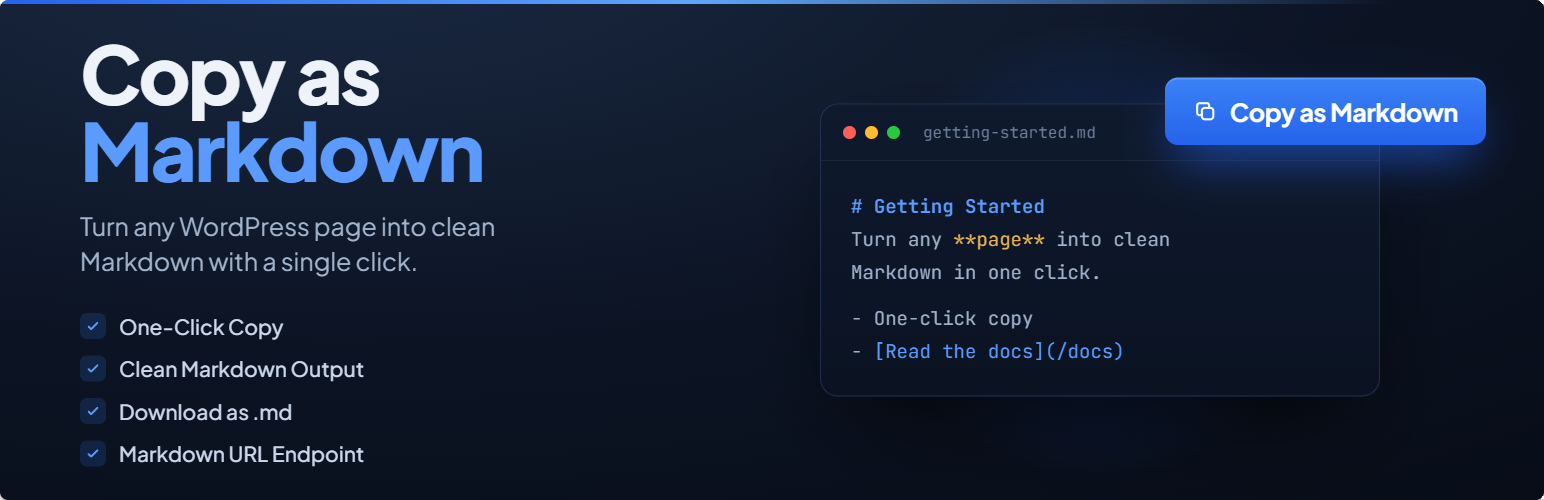
Adds a button to copy markdown, download, and view post as Markdown format. Supports shortcode, Gutenberg block and .md.txt endpoint.

Copy as Markdown Button lets your visitors copy any post or page content as clean, well-structured Markdown with a single click. It handles everything from headings and tables to code blocks and nested lists – no extra tools or dependencies required.

Placement & Auto-injection

  • Automatically injects the button before or after the content on any combination of post types (posts, pages, and custom post types)
  • Shortcode [copy_as_markdown] for manual placement in any post, page, or widget
  • Gutenberg block available in the Widgets category – place it anywhere in the block editor with per-block overrides for button text, size, and content selector
  • Exclude specific posts or pages from auto-injection by entering their IDs – shortcode and block placements are unaffected

Button Customisation

  • Choose button size: Small, Medium, or Large
  • Set custom background, text, and hover colours via colour pickers
  • Adjust corner radius from 0 px (square) to 50 px (pill)
  • Show or hide the copy icon alongside the button label
  • Customise the button label (default: “Copy as Markdown”) and the success confirmation text (default: “Copied!”)
  • Live preview in the settings panel updates instantly as you change style options

Content Control

  • Optionally prepend the post title as a Markdown H1 heading
  • Custom CSS selector to target a specific page element instead of the auto-detected content area
  • Exclude any elements from the Markdown output using CSS selectors (one per line) – useful for stripping ads, share buttons, comment sections, and related posts
  • Per-shortcode overrides for button text, size, content selector, and download button visibility

Download Button

  • Optional dropdown “Download as .md” button that saves the converted Markdown as a .md file directly from the browser, named after the post slug
  • Appears alongside the copy button in a split-button dropdown
  • Can be force-enabled or force-disabled per shortcode instance using the download attribute

Markdown URL Endpoint

  • Enable a .md.txt URL endpoint so any post or page can be viewed as plain-text Markdown by appending .md.txt to its URL (e.g. yoursite.com/your-post-slug.md.txt)
  • The server converts the post HTML to Markdown and serves it as text/plain – useful for programmatic access, LLM ingestion, and content pipelines
  • Works with Elementor pages by using Elementor’s own renderer when available
  • Optional “View as Markdown” link in the button dropdown opens the plain-text endpoint in a new tab
  • Customisable link label for the “View as Markdown” item

HTML-to-Markdown Conversion

The converter handles a wide range of HTML elements cleanly:

  • Headings (H1–H6), paragraphs, line breaks, and horizontal rules
  • Bold (**), italic (*), and strikethrough (~~) inline formatting
  • Hyperlinks with optional title attributes; images with alt text and titles
  • Fenced code blocks with language detection from the language-* CSS class
  • Inline code with backtick escaping
  • Blockquotes with proper > prefixing on every line
  • Ordered and unordered lists with full nested list support
  • Tables converted to GitHub-Flavored Markdown pipe tables
  • Figures with italicised captions
  • YouTube iframe embeds converted to [Video](url) Markdown links
  • Scripts, styles, navigation, and form elements are automatically stripped

Accessibility & Performance

  • ARIA labels, role="status" live region for screen-reader announcements after copy
  • Keyboard-navigable dropdown with aria-expanded and role="menu" semantics
  • Frontend CSS and JavaScript are only loaded on pages where the button will actually appear
Editorial note: This overview combines WordPress.org official plugin metadata with an AI-assisted LethaldiranMX editorial review. Plugin data should be verified on the official WordPress.org listing before installation.

  • button,
  • content,
  • copy,
  • export,
  • markdown,
  • wordpress plugin
Previous Post

Clonable – Translate Woocommerce / WordPress website. Multilingual in 5 minutes.

Next Post

KVWB Emergency Backup Access

Leave a Comment Cancel reply

Your email address will not be published. Required fields are marked *

Categories

  • Thoughts (1)
  • Trends (1,242)
  • Tutorials (1)

Recent Posts

2026-10-14
Agrunert E-Rechnung for ZUGFeRD
2026-10-13
Rotascore Live Scores Widget
2026-10-12
Ettrick Escape Room Booking
2026-10-11
Qrlastica – QR Code Generator with
2026-10-10
Anchormender – Internal Link Suggestions, Orphan

Archives

  • October 2026
  • September 2026
  • August 2026
  • July 2026
  • June 2026
  • May 2026
  • April 2026

Tags

accessibility admin AI analytics automation backup blocks booking calendar chat chatbot checkout contact form contact form 7 content customer support ecommerce elementor forms GDPR GEO gutenberg lead generation live chat llms.txt login openai optimization payment gateway performance popup privacy products rest-api Schema security SEO shipping shortcode support tracking whatsapp widget woocommerce wordpress plugin
  • shape1
  • shape2
  • shape3
  • shape4
  • shape5
  • shape6
  • shape7

Newsletter SignUp!

    About Us

    GROWTH,ARCHITECTED.
    Empowering global brands through data-driven SEO, high-performance web development, and AI-forward strategies.

    Information

    • Extensions
    • Strategies
    • Creatives
    • Plugins

    Services

    • AI & Strategy
    • Growth Marketing
    • Operations & CRO
    • Tech & Analytics

    Office Address

    • Nan'an District, Chongqing
    • +86-133-1028-2690
    • [email protected]
    • +86-133-1028-2690
    © Copyright AEOSUB 2026 | Digital Growth & Full-stack Operations
    • Home
    • About
    • Case Study
      • Case Study 1
      • Case Study 2
      • Case Study 3
      • Case Study 4
      • Case Study 5
    • Elements
      • Blog
        • Blog Post 1
        • Blog Post 2
        • Blog Post 3
        • Blog Post 4
        • Blog Post 5
        • Blog Post 6
      • Service
        • Service Gallery 1
        • Service Gallery 2
        • Service Gallery 3
        • Service Gallery
        • Service Gallery 5
      • Team
        • Team Gallery 1
        • Team Gallery 2
        • Team Gallery 3
      • Testimonial
        • Testimonial – 1
        • Testimonial – 2
        • Testimonial – 3
      • Contact Info Box
        • Contact Info Box 1
        • Contact Info Box 2
      • Info Box
        • Info Box 1
        • Info Box 2
        • Info Box 3
      • Miscellaneous
        • Brand Showcase
        • Counter 1
        • Progress Bar
        • Progress Box Image
        • Radius Button
        • Section Title Subtitle
      • Pricing
        • Pricing Plan 1
        • Pricing Plan 2
        • Pricing Plan 3
        • Pricing Plan 4
        • Pricing Plan 5
    • Pages
      • Service
        • Service Archive
      • Case Study
        • Case Study Archive
        • Single Case Study 1
        • Single Case Study 2
        • Single Case Study 3
      • Team
        • Team Gallery 1
        • Team Gallery 2
        • Team Gallery 3
      • Typography
      • 404 Error
    • Blog
      • Blog 1
      • Blog 2
      • Blog 3
    • Contact
    Follow Us
    FREE ANALYSIS
    • Home
    • Services
      • Col 1
        • Tech & Analytics
        • Web Development
        • Technical Audit
        • Analytics & Tracking
      • Col 2
        • Growth Marketing
        • SEO Strategy
        • SEM & PPC
        • Social Growth
      • Col 3
        • AI & Strategy
        • Al Search (GEO)
        • SEO Content
        • Growth Consulting
      • Col 4
        • Operations & CRO
        • Conversion (CRO)
        • AI Automation
        • Full-stack Ops
    • Projects
      • Strategies
      • Plugins
      • Extensions
      • Creatives
    • Insights
    • About
    • Contact
    • English
      • Chinese
    Follow Us