- 2026-07-18
- by LethaldiranMX
- Trends
- 0 Comments

LethaldiranMX Insight
AnyDress addresses two of the most capital-intensive bottlenecks in apparel e-commerce: high return rates due to sizing uncertainty and the exorbitant costs of professional model photography. By integrating an interactive virtual fitting room directly into the WooCommerce product page alongside an admin-facing AI photo studio, it bridges the gap between customer confidence and catalog management. From a technical standpoint, the plugin’s hybrid approach of using local server storage for temporary user assets combined with external AI processing offers a modern, high-value utility for scaling fashion brands.
Best Fit & Operational Role: This plugin is best suited for mid-market WooCommerce apparel, footwear, and accessory brands looking to reduce return rates (bracketing) and optimize their content pipeline without maintaining a continuous photography budget. Operationally, it functions as both a frontend conversion optimization tool and a backend asset-generation utility, hooking directly into standard WooCommerce templates. It solves the critical problem of visual sizing validation for shoppers while allowing store managers to quickly generate high-quality, on-model catalog imagery directly from flat-lay or ghost mannequin photos within the WordPress dashboard.
Potential Limitations & Pitfalls: While the privacy-first architecture is commendable—retaining shopper photos locally on the host server for seven days before auto-deletion—this design choice introduces temporary storage overhead that scaling stores must monitor, particularly on shared or resource-constrained hosting environments. Additionally, because the plugin relies on external AI engines to process try-ons and generate images, administrators must ensure their privacy policies and GDPR/CCPA compliance frameworks explicitly account for this data transmission, despite the built-in consent checkboxes. Developers should also audit theme compatibility, as custom, non-standard WooCommerce product templates may require manual hook overrides to position the “Try It On” button correctly.

AI virtual try-on for WooCommerce: shoppers try on clothes on their own photo, and you generate studio-quality product images without models.
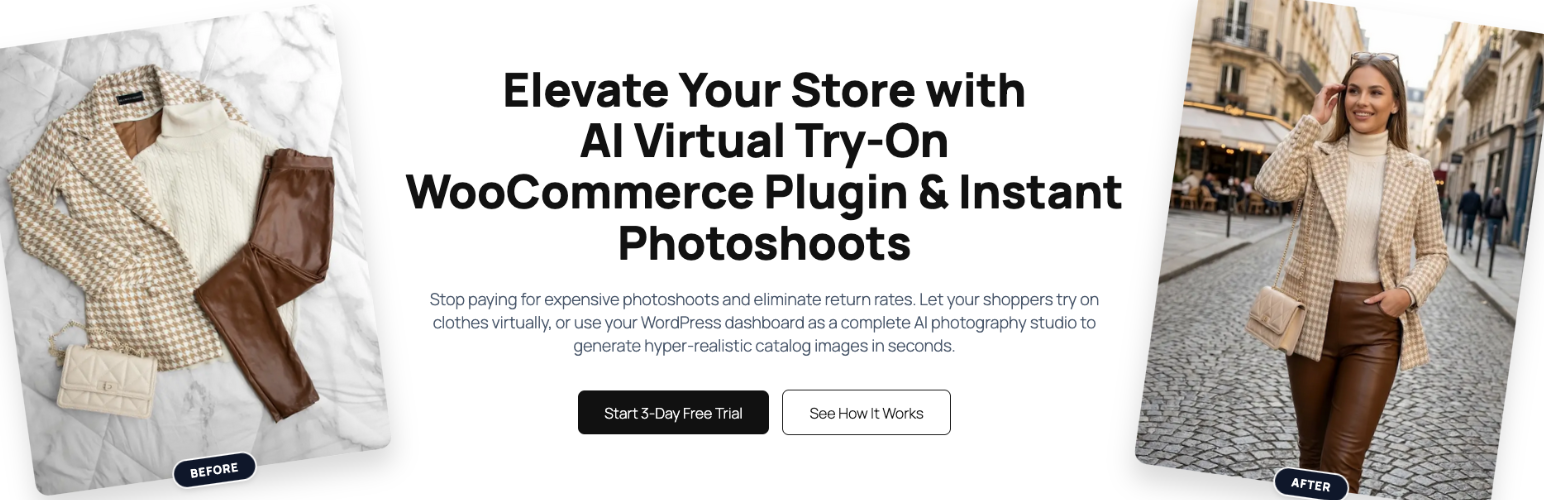
AnyDress adds an AI virtual fitting room to your WooCommerce store — and an AI photo studio to your dashboard. Shoppers can virtually try on clothes using their own photos before they buy, and store owners can generate professional product images without models, photographers, or physical photoshoots.
One plugin, two revenue levers: higher conversions from confident shoppers, and lower costs from AI-generated catalog photography.
A virtual fitting room for your shoppers
A customizable “Try It On” button appears on your product pages, right next to Add to Cart. Shoppers upload a photo (or reuse their saved Digital Mannequin) and see exactly how the garment looks on their own body — not on a model who looks nothing like them.
- 1-click try-ons across your whole store — logged-in shoppers securely save face and body photos once, then try on anything.
- True-to-size fit — pair try-ons with real garment measurements so shoppers see (or get warned about) sizes that run tight or loose. Fewer sizing mistakes, fewer returns, less bracketing.
- Works with your theme — hooks into standard WooCommerce templates automatically.
An AI photo studio for store owners
The Virtual Photoshoot dashboard turns a flat lay, hanger shot, or plain packshot into studio-quality on-model imagery in minutes:
- Generate catalog images from your existing WooCommerce product photos or raw garment uploads.
- Choose an AI model, upload your own model, or create clean ghost mannequin shots.
- Describe any custom background or scene in plain words.
- Magic Edit — change pose, aspect ratio, resolution, and photography style after generation.
No studio rental, no model fees, no reshoots when your catalog changes.
Built-in size charts
Create reusable size charts (tops, bottoms, dresses, outerwear, swimwear, eyewear, headwear) with real garment measurements per size. Assign them to products in bulk, override values per product, and let shoppers optionally add their own measurements (cm or inches) for a realistic fit.
Privacy-first by design
- Explicit consent checkboxes for both shoppers and admins — no data reaches the AI engine without agreement.
- Shopper photos live on your own server, auto-deleted after 7 days; shoppers can delete their data anytime from My Account.
- Images are processed in memory and discarded by the API immediately after generation — never used to train AI models.
Perfect for
All features
- Shopper Virtual Try-On: customizable “Try It On” button on WooCommerce product pages.
- Digital Mannequin: shoppers securely save photos for 1-click try-ons store-wide.
- Admin Virtual Photoshoot: generate product catalog images from products or raw garment uploads.
- AI Models & Ghost Mannequins: original model, your own model, a generated AI model, or invisible ghost mannequins.
- Custom Backgrounds: describe any scene to place your models in.
- Magic Edit: alter pose, aspect ratio, resolution, and photography style.
- Size Charts & True-to-Size Fit: reusable charts with per-size garment measurements, bulk assignment, per-product overrides.
- Shopper Measurements (optional): private body measurements for realistic fit rendering and sizing advice.
- Usage Controls: daily try-on limits to protect your API budget.
- Privacy-First Design: built-in legal consent flows for shoppers and admins.
Learn more
- How AI virtual try-on works in WooCommerce
- Creating product images without models
- Reducing clothing return rates
- Plans and pricing
External Services
This plugin relies on the AnyDress AI SaaS platform (https://anydress.ai) to process and generate images. An active AnyDress AI API key is required to use this plugin.
- What the service is used for: The AnyDress AI API provides the artificial intelligence engine required to “clothe” a digital mannequin with a product image and to generate studio-quality catalog photoshoots.
- What data is sent and when:
- Shopper Try-On: Only after a logged-in user gives explicit consent via a checkbox, their uploaded photos (Face/Body) and the WooCommerce product image are converted to Base64 and sent to the AnyDress AI endpoint.
- Optional Fit Data: If the shopper voluntarily enters body measurements, those numbers (together with the store’s garment measurements for the selected size) are sent alongside the try-on request to render a realistic fit. Measurements are never required.
- Admin Photoshoot: Only after the administrator confirms rights to the images, the selected garment and model photos are sent to the API.
- Verification & Task Status: The store domain, license key, and generation task IDs are sent to verify subscription status, usage limits, and to retrieve finished images.
- Data Handling & Privacy: Images are processed in secure server memory to generate the result and are immediately discarded by the API upon completion. User data is confidential and never used to train AI models.
- Terms & Privacy Links:
- Terms of Service: https://anydress.ai/terms-of-service/
- Privacy Policy: https://anydress.ai/privacy-policy/
Editorial note: This overview combines WordPress.org official plugin metadata with an AI-assisted LethaldiranMX editorial review. Plugin data should be verified on the official WordPress.org listing before installation.